How to choose social media software for your agency
Choose agency software by rehearsing the service your clients will buy: bring in one client, prepare a deliverable, get it reviewed, send it through the right profiles and explain the result. Then price the full operating cost. A feature list is a starting point for that evaluation.
This guide is published by Sociamonials. It explains how to evaluate any candidate and where AgencyPro fits. “Observed” below refers to our limited September 30, 2026 checks; “documented” means a current product capability that was not exercised end to end in this evaluation.
Start with your business model
A software reseller needs client access, branding and a support plan. A managed-service agency also needs a dependable content and approval process. A hybrid agency needs both, with a clear boundary between the work included in each package. Write a one-sentence offer before comparing tools: “For this kind of client, we deliver this item at this frequency, with this review process.”
1. Check the branding your clients will actually see
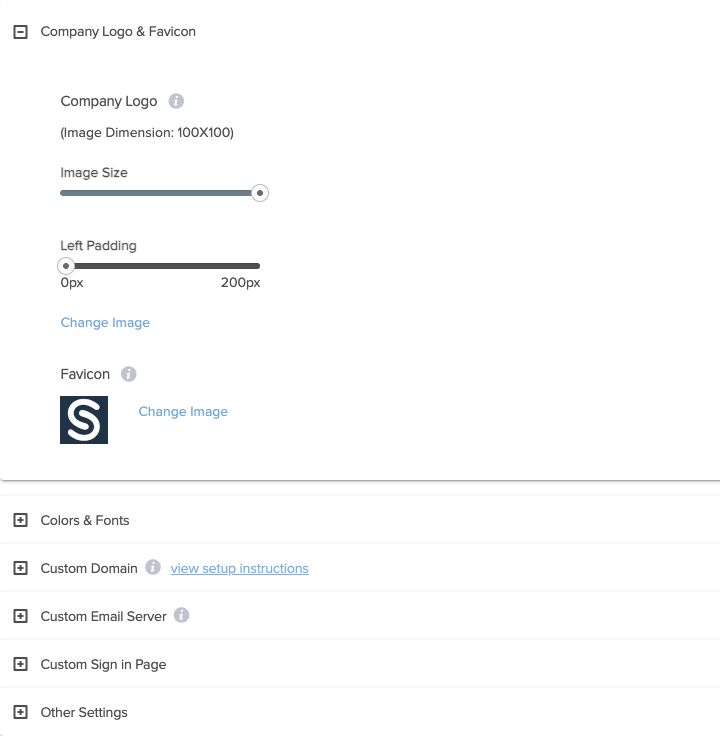
Ask to see the sign-in experience, agency identity, workspace navigation, reports and routine messages. AgencyPro has name, logo and custom-domain controls. The screenshot shows the agency branding settings in our staging test account; it is not evidence that every client-facing or third-party surface is white-labeled.
2. Rehearse client separation and approval
Use two test clients with different instructions. Verify that their brand briefs, profiles and content stay in the correct workspace. Assign a reviewer, make a revision and check what happens when approval is withheld. For an assistant integration, verify the credential’s assigned workspaces and allowed actions as well as the approval configuration. A successful draft validation is not an approval record.
3. Ask reporting to answer a client question
Pick a question such as “What was delivered this week, and what happened next?” Check the available date range, network coverage, metric definitions and client-facing output. Sociamonials offers reporting, but you should test the specific report your service requires. If you intend to report leads or revenue, trace the relevant tracking through to your sales records. Engagement or clicks alone cannot establish a sale.
4. Include the campaign you plan to sell
If your offer includes a giveaway, testimonial collection or another campaign, evaluate that campaign type directly. Inspect its public page, entry process, limits and follow-up responsibilities. Sociamonials includes campaign tools alongside publishing; API coverage is narrower than assuming every interface action has an automated equivalent. Check the exact operation in the API documentation before committing to an automated package.
5. Test useful automation and its stop conditions
An agency assistant should identify the client, load current context, check permissions and show the resulting state. We tested profileless draft validation across two staging workspaces and observed a scheduling validation failure when the client workspace had no eligible default Facebook destination. The recorded validation rehearsal includes the requests, responses and a reusable prompt. Actual draft creation, approval submission, scheduling and delivery were outside that test.
| Requirement | Sociamonials evidence in this evaluation | Your acceptance check |
|---|---|---|
| Agency identity | Observed staging branding controls; current product source confirms name/logo/domain settings | Inspect the screens and messages your clients will use |
| Separate client workflows | Observed assigned-workspace context and draft validation in two staging workspaces | Run a full deliverable in each intended client workspace |
| Human approvals | Documented; not submitted in our rehearsal | Withhold approval, revise and verify the resulting state |
| Publishing and campaigns | Documented; no social post or campaign was published in this evaluation | Test the exact network, media and campaign type in your offer |
| Client reporting | Documented; no client revenue attribution was verified | Reconcile a report against known delivery and sales records |
| AI automation | Observed validation success and an ineligible default Facebook destination; one production workspace cross-check | Test permissions, holds and recovery before unattended operation |
6. Compare total cost at your current size
Include the software subscription, any extra workspace or profile allowances, assistant or automation costs, creative assets and the time spent delivering the service. Confirm optional services and overage pricing for the specific offer you will buy. Do not treat a promotional headline or a theoretical full-capacity cost per workspace as your actual acquisition or service cost.
AgencyPro Standard is $199 USD monthly for 25 total workspaces: one primary plus 24 additional. Max is $999 monthly for 150 total: one primary plus 149 additional. These are the current monthly offers checked September 30, 2026. Review plan details and checkout options. Eligible new, first-time members must cancel within 30 days of first signing up to qualify for a refund; previous members are excluded. Read the full Terms.
Here is an illustrative budget, not a revenue forecast: if you use Standard for five paying clients and your primary agency workspace, the $199 subscription alone is $39.80 per paying client per month. At ten paying clients it is $19.90. Neither figure includes your labor, customer acquisition, payment processing, tax or external AI services. Record those actual costs before choosing your selling price.
| Monthly cost item | What to record |
|---|---|
| Base subscription | Current price, billing term and included allowances |
| Additional capacity | Expected clients and profiles above the allowance; confirmed unit price |
| External services | Assistant subscription or API use, assets and any optional services |
| Delivery and support time | Hours per client multiplied by your actual labor cost |
| Sales and payment costs | Acquisition expense and processing costs from your own records |
When to choose AgencyPro—and when to choose a smaller scope
Put AgencyPro on your shortlist when you want branded client software or managed delivery across separate workspaces, and the combination of publishing, campaigns, reporting and agency API access matches your service. If you only market one business, compare Grow and Thrive and the Workspace API first. If a required integration, campaign type or report has not been verified, get that answer before committing.
Define a first-month success test
Week one: complete a first client setup and reviewed deliverable. Week two: repeat the workflow and log friction. Week three: inspect delivery and reporting with the client. Week four: review time spent, usage and the next recurring service date. Measure completed, repeated client delivery; a workspace created once is not evidence of a sustainable service.
Review AgencyPro plans Read AgencyPro answers · Ask about a requirement